Verify
What is Verify?
Verify lets you ask questions about a case's Paginated and Indexed Bundle in plain English and get an answer sourced directly from the documents - with a citation next to each claim showing exactly which page it came from, so you can check it yourself in seconds.
Think of it as a faster way to interrogate a bundle you'd otherwise search manually - not a replacement for reading the records, but a way to get to the specific fact you need without paging through hundreds of scanned documents.
How to access Verify
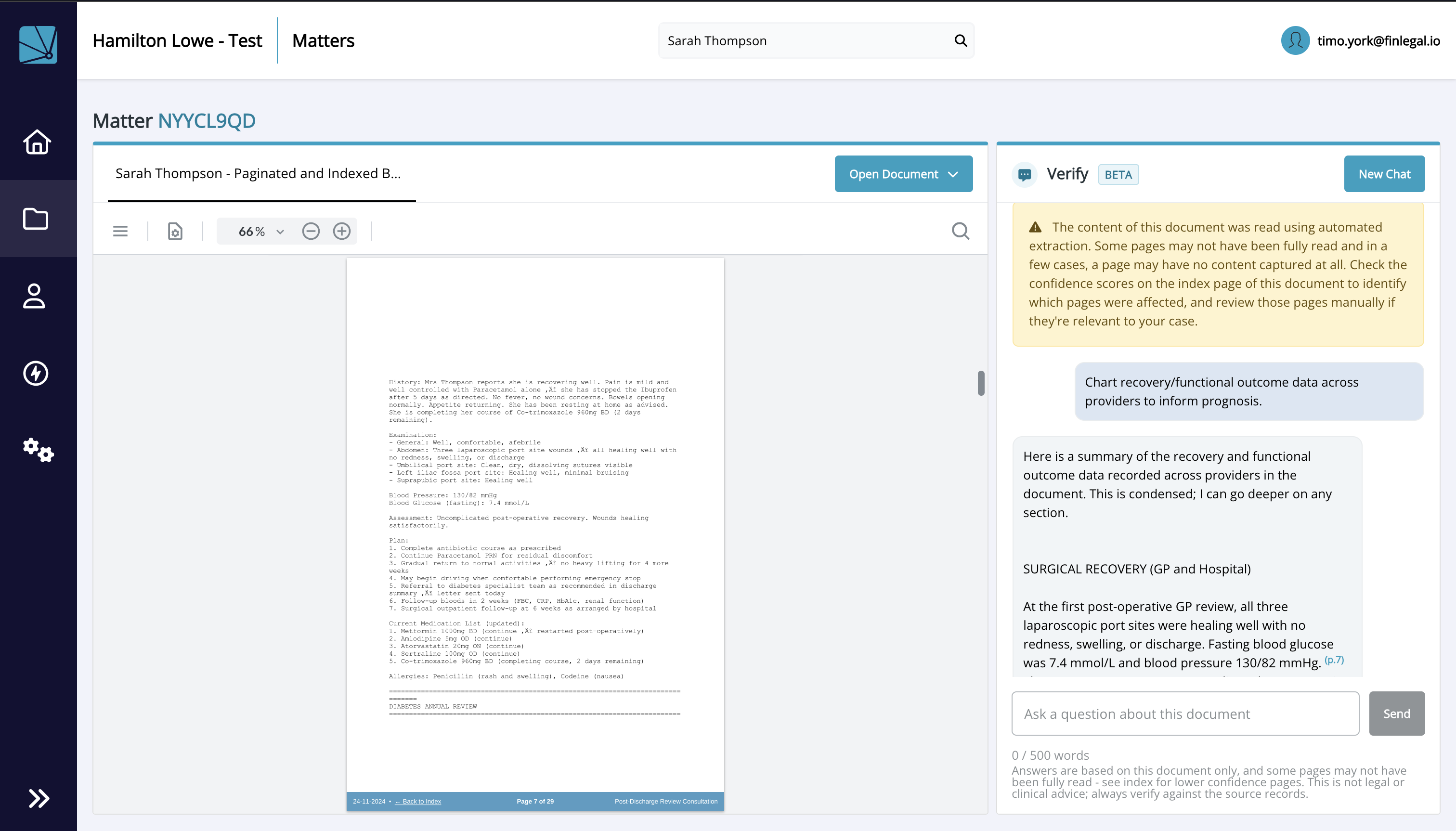
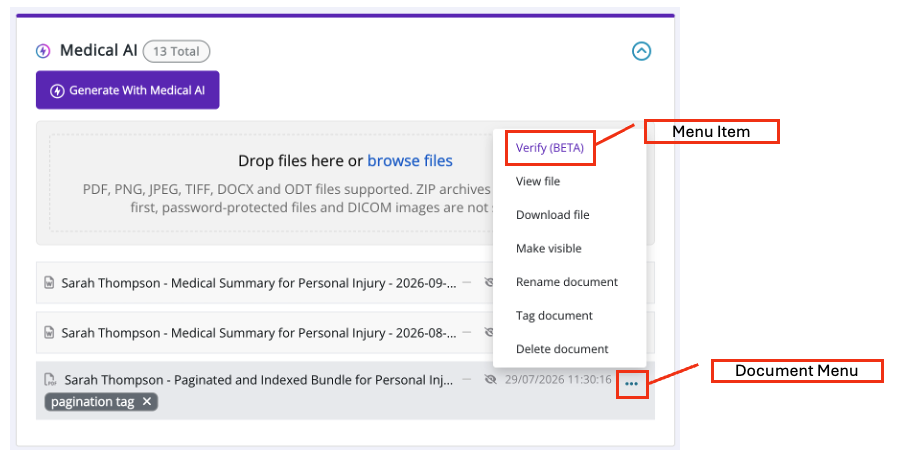
Verify is available from the documents panel, on any case where a Paginated and Indexed Bundle has been generated since the launch of Verify. Look for the 'Verify' menu item in the Document menu - it opens a two-panel view: your conversation on the right, and a tabbed panel on the left holding the source PDF and your case notes.
What to ask
Verify works best for questions that can be answered directly from what's in the bundle:
- "What did the GP note about [symptom] on [date]?"
- "Give me a timeline of [event] from first presentation to resolution."
- "Does the bundle contain any records from [earlier procedure/event], or does it only reference it?"
- "Are there any inconsistencies between providers' records - for example in [allergy status/medication/reported severity]?"
- "How does the patient's own account in [diary/statement] compare to what the clinical records say about [symptom/recovery] over the same period?"
There's a 500-word limit per question - enough for a detailed question, not for pasting in a document. The input box expands as you type, so you can review a longer question in full before sending it.
Checking the answer
Every factual claim comes with a citation shown inline, right next to the sentence it supports - click it and the right-hand panel jumps to that exact page in the bundle. We'd encourage you to check citations, especially early on, so you can get a feel for how reliable they are before relying on them for anything that matters.
Verify runs on extracted text: some pages may not have been fully read by automated extraction, or captured at all. Check the confidence scores on the bundle's index page - a citation pointing to a flagged page should be reviewed manually.
You'll also see a permanent reminder in the chat panel: answers are based on the documents in this case only, this isn't legal or clinical advice, and you should always verify against the source records. Your professional judgement stays the responsibility of the person reviewing the case, same as it always has been.
Your session stays open
Your conversation now stays open as you move around the case - switch tabs, check a document, come back, and Verify picks up where you left off. It doesn't carry over once you close the browser tab or log out, so copy anything you want to keep into your notes before then.
Working notes alongside your chat
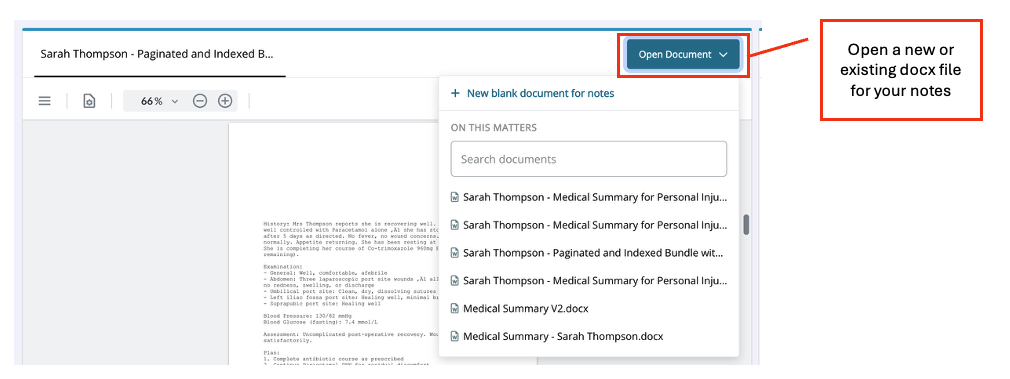
The left-hand panel allows for an additiona document in a tab next to the source document viewer, so you can keep notes going without leaving Verify. You can either:
- Start a new, blank document, or
- Open a document that already exists on the matter or claim
Either way, the document sits open next to your conversation, so you can copy across a fact or citation the moment you spot it.
What it won't do
Verify answers only what's documented in the case records. By design, it will not:
- Say whether care was appropriate or amounted to negligence
- Give a view on the strength of a claim or prospects of success
- Recommend treatment or medication
- Draft letters, documents, or anything beyond reporting what's in the records
If you ask something in this territory, Verify leads with a clear statement that it can't answer, then explains why and, where possible, what to ask instead. This is expected behaviour, not a bug - if it ever does one of the things above instead of declining, please tell us straight away (see Feedback below).
"Not found in records"
If Verify says something isn't in the records, that's a real answer, not a failure - it means a search was done and nothing relevant turned up. It will not guess or fill in a gap from general medical or legal knowledge. If you think something should be there and isn't, check the bundle's page confidence scores first (see "Checking the answer" above) in case the page in question wasn't fully captured - and either way, that's exactly the kind of thing worth flagging as feedback.
A few things to know
- Response times still vary - some questions answer in a few seconds, others (especially "summarise everything about X") can take noticeably longer. You'll see a status update while you wait ("Searching records...", then "Generating response...") so you can tell it's still working - if it's been over a couple of minutes with no change, that's worth flagging.
- One bundle per session - you can't currently ask questions across multiple bundles or cases at once.
- Nothing here is saved as a chronology entry automatically.
Feedback
Verify is still new, and your feedback directly shapes what gets built next. Complete our short feedback sheet whenever something stands out - good or bad - and email it over to Helen Renshaw (helen.renshaw@finlegal.io).
If you have an urgent issue, especially anything under "What it won't do" above behaving unexpectedly, don't wait: flag it to Helen Renshaw (helen.renshaw@finlegal.io) straight away.