Concepts and Data Types
Concepts:
- Company
- Contacts
- Cases
- Claims
- Activities
- Attributes
Data Types:
- Contact Properties
- Attributes (Claim, Case, Contact)
- Attribute Types
- Claim Data
Concepts
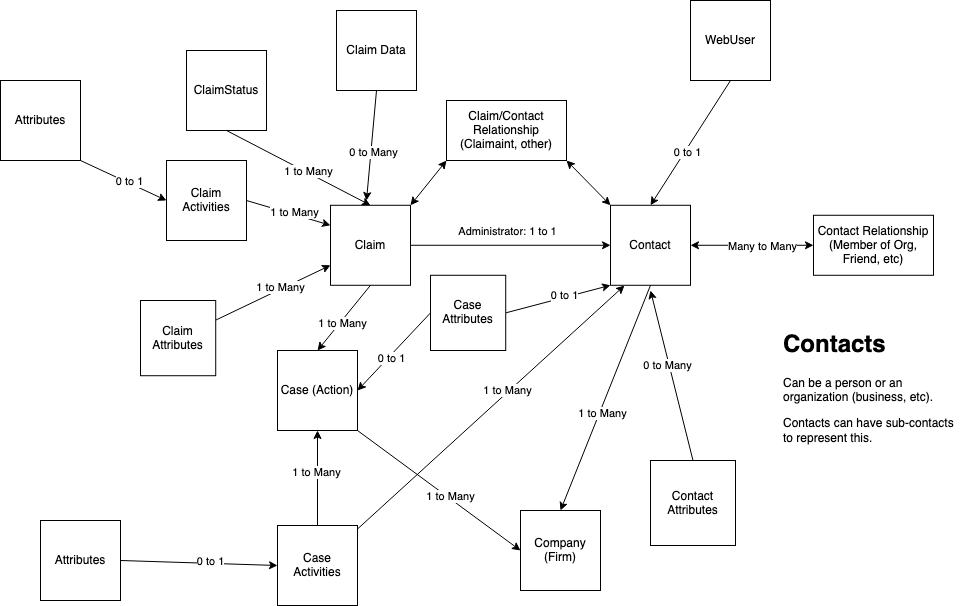
High Level Structure
In it's simplist form you can think of each layer like this:
- Organisation
- Company
- Contact A
- Contact B
- Case 1
- Case 2
- Company
Organisation (not shown in diagram)
Companies belong to an organisation. The reason this was introduced is so we can configure authentication for that customer.
Cases
Cases represent a action or lawsuit that the company is potentially bringing to court.
- The only direct data a Case has is a Name
- A case contains 1+ claims.
- Example: Emissions Case
- Aka as "Actions" in Australia
Company
This is our customer.
- Example: "Harcus Parker" or "Maurice Blackburn".
- A company hosts/contains 1+ cases
- We have a
Testcompany and aLivecompany. Above that sites anOrganisation(not shown in this diagram).
Claims
A claim is an instance of one or more claimants being part of a case. The individual claim being made.
- Currently, claims directly have no data except knowing the Administrator and 0 to many Claimants of the Claim.
- Each claim can have multiple contacts related to it, but there is only one "Administrator contact" per claim (see Contact Administrator section below for details).
- A claim cannot exist without an administrator.
- The
claimshould be about the thing you are claiming about. For example, if it's a VW emissions claim, the information about your vehicle should be on thatclaim.
Contact
Contacts represent individuals or organizations in Claims Automation. Contacts can be Claimants, Administrators of Claims or Companies which is a group of Contacts. Contacts can be related to one another. Typically, the only relationship is "member" to show people that are in organizations.
- Contacts "live" within a Company and can be related to 0 or many Claims directly. Therefore, they are indirectly related to Cases.
- Information about a person or organisation. On it's own it just contains contact information e.g. Name, Address, Phone etc.
- Example, say a Company "Law Firm A" could have 300 contacts, split across 10 cases with 25 of those contacts not belonging to any claims at all. Some of these contacts may also be involved with multiple cases that Law Firm A are running.
- Sub-contacts can also exist. E.g. an Organisation may have several sub contacts.
- The Claim/Contact relationship is what links a contact to a claim.
Contact Administrator
- Usually also the
Claimantbut not always. - Currently admins on a claim cannot be swapped, but this is a feature that may come soon.
- Delegated Admins: New feature introduced where Administrator Contact can delegate others to be able to login on their behalf.
- In every Claim you will have a related Contact Administrator .
- Generally these are known as "The Claimant" but from a technical backend perspective, these are known as the "Contact Administrator" as they administer the claim. They've done the registration, been most effected etc.
- Example: if the claim is for car emissions, it may be a husband & wife making the claim**.** One of those with be the admin contact.
- Although you may have several contacts on a claim, it's ONLY ever the Contact Administrator that logs in.
- If an email is sent regarding a claim, it is the Contact Administrator who gets the email (although it is now possible to send emails to other contacts in the claim now - this is a bit of a stretch of the original business rules).
This is a way to link contacts to claims. You can have different relationships, but there is hard-coded relationship called the Administrator Relationship, which is 1-to-1 (you can only ever have 1 Contact Administrator per Claim).
Activities
Activities are the mechanism through which data is gathered from Contacts (as a Claim Administrator) into Claims Automation. They have a lifecycle and attributes directly associated.
An activity is essentially a form that we display on the case site, they are called Activites in the backend. If you have 4 activities, you have 4 forms. You don't see them all at the same time, the timeline control handles the logic of when to show each activity.
Types
- CLAIM Activity - directly related to a Claim (indirectly related to a Case)
- CASE Activity - directly related to a Contact and a Case outside the scope of a Claim)
- Sometimes in the signup process we to collect certain information before we know which claim we need to create for the individual.
- Generally you won't see case activities, if the case only has one claim related to it. Multi-claim cases are decided early on.
Lifecycle
- Open - new, assigned but not yet acted upon
- Submitted - the contact has submitted data that should be checked
- Accepted - the case handler has validated the data manually or automatically through workflow
- Partially Accepted - the case handler needs to pause workflow or otherwise pause the claim
- Rejected - the case handler rejects the submitted data. Typically, another or same activity is assigned again (open)
- Deleted - hide the activity and no longer act upon it
The notion of a "Client" is a single individual (Contact) that is bringing a Claim within a case themselves as a Claimant. For many cases, this is enough detail. However, there are cases where the Claim is being done on be half of someone else. This is why a Claim now separates the Administrator and Claimant(s).
A Claim requires a single Administrator but can have zero to many Claimants as part of it.
The "old" Client style is where there is a Claim who's Administrator is also the sole Claimant.
Data
Contact Properties
This are basic data types that belong to Contacts. This is usually personal information about an individual or company. It could also be preferences such as GDPR settings.
These are the values that are typically searchable:
- Phone
- SecondaryPhone
- FirstName (for individual contacts)
- MiddleName (for individual contacts)
- LastName (for individual contacts)
- CompanyName (for company contacts)
- City
- PostCode
- State
- AddressLine1
- AddressLine2
- Country
Attributes
Some of the information captured in activities is used to drive business logic. These data items are promoted to attributes. Which are scalar data values that can live on Contacts, Cases, Claims and Activities.
The customer or customer-success team defines these attributes/data points.
Attributes are scalar types that are associated to different case funnel concepts. Attributes are of the following types:
- String
- Text
- TextArea
- DropDown (Enum of strings)
- Boolean
- Checkbox
- DateTime
- Date
- DateTime
- Double
- Number
- Currency
- Json
All attributes should have a template which defines their name and data type.
There is also a usage type to allow differentiating who can see or edit the attribute covering:
- Standard/Default: Read/Write
- Protected: Holds sensitive data. You can only see these if you have certain permission.
- Readonly: Only read, no write.
Attribute Types
Contact Attributes
These are attributes that are related to a single Contact. This are effectively company-wide attributes for a person and not related to any case or claim.
Mentioned above, we provide a standard set of fields such as name, address etc which have static columns within the tables.
Case Attributes
These are attributes that are related to a single Contact and Case. This are case specific attributes for a person and not related to any single claim.
Claim Attributes
- These are attributes that are related to a single Claim.
- These are claim specific attributes to a single claim.
- Claim attributes may or may not be related to a single Contact but typically are.
Much like contact properties, this are essentially static attributes that have static columns in the tables.
Activity Attributes
These are attributes that are related to a single Activity. This activity should have been submitted by a Contact so they could be Contact specific or Claim.
Claim Data
This is data directly associated to the Claim that is typically bulk JSON as opposed to a scalar value of an attribute.